

For decades, Microsoft Excel has served as the undisputed computational backbone of global business. From small-business cash flow tracking to multinational corporate financial modeling, spreadsheets process billions of rows of critical data every single day. Yet, for all its immense power, traditional Excel demands a steep technical tax. Professionals spend countless hours memorizing labyrinthine syntax, debugging nested IF statements, writing fragile VBA macros, and manually scrubbing inconsistent data sets. The modern enterprise no longer has time for manual spreadsheet plumbing. The emergence of AI Excel automation is fundamentally rewriting the rules of data work, transforming spreadsheets from static grids into dynamic, conversational engines of productivity.
Artificial intelligence bridges the gap between human intent and software execution. Instead of forcing analysts to translate business questions into technical formulas, AI allows them to simply state what they want to achieve in plain, conversational language. Whether you are scaling an e-commerce operation, auditing complex financial ledgers, or building board-level executive dashboards, integrating machine learning into your spreadsheet workflows eliminates friction at every turn. In this comprehensive guide, we examine seven powerful ways artificial intelligence is revolutionizing data work within the spreadsheet ecosystem.

1. Generating Complex Formulas Instantly with Natural Language
Few professional experiences match the frustration of staring at a failing formula, searching for a missing comma or misplaced parenthesis across a five-tier nested calculation. Traditional spreadsheet training required mastery over function syntax, absolute versus relative referencing, and arcane error codes. AI Excel automation obliterates this barrier by letting natural language processing do the heavy lifting.
How Natural Language Processing Interprets Your Request
Modern AI tools embedded within spreadsheet environments leverage advanced Large Language Models (LLMs) trained specifically on mathematical and tabular logic. When you input a command, the algorithm parses your semantic intent rather than scanning for strict keyword matches. It understands context, relational logic, and business terminology, converting casual descriptions into precise computational rules.
For instance, instead of mentally mapping out column indices and lookup arrays, you can input a descriptive prompt such as: “Look up the employee ID in column A within the Q3 payroll sheet, and return their matching bonus percentage if their performance score is greater than four.” The underlying AI engine evaluates the schema, determines the appropriate function architecture, and outputs the exact syntax required.
Translating Plain English into Nested IF and XLOOKUP Functions
Writing multi-condition logic historically required meticulous structuring to avoid syntax errors and logical fallacies. With generative AI, users can bypass the trial-and-error phase entirely. You describe the tiers of your commission structure, tax bracket rules, or inventory thresholds, and the AI constructs bulletproof formulas in milliseconds.
- Complex Conditional Logic: Instantly generate multi-tiered conditional statements without worrying about false triggers or missed boundaries.
- Modern Lookup Migration: Automatically convert legacy, error-prone
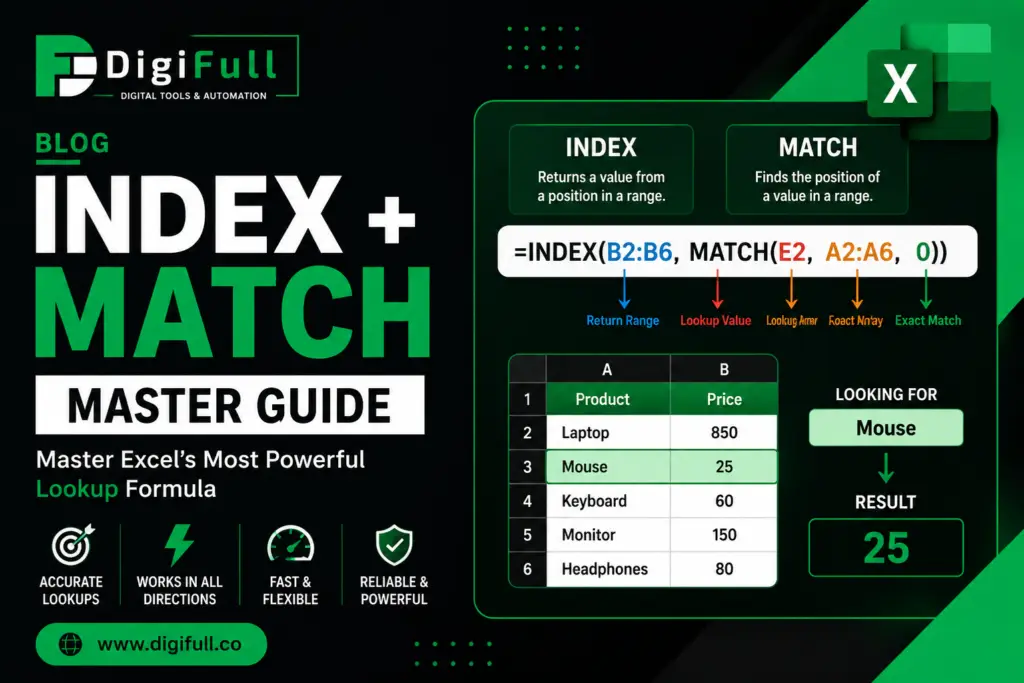
VLOOKUPformulas into robust, bi-directionalXLOOKUPorINDEX/MATCHcombinations. - Error Wrapping: Automatically append error-handling wrappers like
IFERRORorISBLANKto maintain pristine reporting sheets during large-scale data imports.
2. Automating Repetitive Data Cleaning and Formatting
Data professionals frequently cite data cleaning as the most time-consuming and least rewarding part of their job. Raw data exported from CRM systems, web scrapers, or legacy databases is notoriously messy. Dates are formatted inconsistently, text strings contain stray whitespace, and duplicate entries distort key metrics. Manual remediation is both tedious and prone to human oversight.
Detecting and Fixing Inconsistent Data Sets Automatically
AI-driven cleaning algorithms scan massive tables in fractions of a second, identifying anomalies that human eyes easily miss. These models detect outliers in numerical sequences, flag duplicate records based on fuzzy matching logic, and highlight structural breaks in data continuity. Rather than writing complex regular expressions or running manual filters, you simply instruct the AI assistant to inspect the dataset for integrity issues.
The system evaluates patterns across rows and columns to suggest remediation strategies. If half of your customer database lists countries as “USA” and the other half as “United States of America,” intelligent automation recognizes the semantic equivalence and standardizes the entire column with a single confirmation click.
Standardizing Dates, Currencies, and Text Strings
Inconsistent formatting ruins automated reporting and breaks downstream data pipelines. AI models excel at normalizing disparate data types into unified, enterprise-ready formats.
- Date Normalization: Convert mixed date formats (MM/DD/YYYY, DD-Mon-YY, Unix timestamps) into an ISO standard instantly.
- Currency Conversion: Standardize multi-currency financial sheets by applying automated rate lookups based on transaction timestamps.
- Text Parsing: Split messy name and address fields, capitalize proper nouns, and strip out invisible non-printing characters effortlessly.
3. Advanced Predictive Analytics and Forecasting
Historically, building predictive models required exporting spreadsheet data into specialized statistical software like R, Python, or proprietary econometric packages. Today, AI-powered forecasting tools bring data science capabilities directly to the cell grid, empowering everyday analysts to look forward rather than backward.
Uncovering Hidden Trends and Historical Seasonality
Machine learning models integrated into spreadsheets analyze multi-year historical data to detect subtle seasonal cycles, cyclical market trends, and long-term growth trajectories. Unlike simple linear trendlines, advanced algorithms account for holiday spikes, day-of-the-week variances, and macroeconomic indicators.
The AI evaluates multiple regression models simultaneously, tests for goodness-of-fit, and selects the optimal mathematical approach for your specific dataset. This democratization of data science means financial controllers and marketing leads can run sophisticated trend analyses without writing a single line of statistical code.
Building Reliable Sales and Financial Projections
Generating trustworthy forecasts requires accounting for uncertainty and variance. AI-driven forecasting tools automatically construct confidence intervals, upper bounds, and lower bounds around your projections.
- Scenario Modeling: Ask the AI to adjust assumptions based on varying market conditions, such as a 15% increase in customer acquisition costs.
- Automated Variance Analysis: Instantly compare actual performance against predicted baselines and receive automated written summaries explaining the primary drivers of variance.
- Inventory Optimization: Predict stock depletion dates based on lead times and historical velocity, preventing both stockouts and excess overhead.

4. Intelligent Data Visualization and Chart Recommendations
Data storytelling is essential for executive buy-in, but choosing the wrong chart type can obscure critical insights or mislead stakeholders. Many professionals default to standard bar charts or pie charts simply because they are familiar, ignoring visualizations that better represent multidimensional data.
Letting AI Choose the Best Visual Representation for Your Data
Intelligent visualization engines analyze the underlying architecture of your data table—evaluating variable types, value distributions, and categorical hierarchies—to recommend the most impactful chart type. If your data contains geographic coordinates, it suggests interactive maps; if it tracks continuous distribution over time, it recommends specialized sparklines or area charts.
The system automatically configures data axes, applies professional color palettes adhering to data-design best practices, and adds explanatory titles. This eliminates the guesswork of chart formatting and ensures that presentations communicate insights with maximum clarity.
Creating Dynamic Dashboards with Minimal Manual Effort
Building executive dashboards traditionally involved linking multiple pivot tables, writing custom slicer connections, and spending hours aligning visual elements. AI automation streamlines dashboard creation by auto-generating complete visual suites based on your primary analytical objectives.
- Intent-Driven Generation: Type “Create a regional sales dashboard showing top performers and profit margins,” and watch the layout assemble itself.
- Smart Slicers: AI automatically identifies key categorical dimensions and generates interconnected filters for seamless exploration.
- Conditional Highlighting: Intelligent formatting rules automatically apply alert colors to key performance indicators trending below target thresholds.
5. Writing and Debugging VBA Macros with Generative AI
Visual Basic for Applications (VBA) has powered custom spreadsheet automation for decades. However, learning VBA syntax requires traditional programming knowledge that many business analysts do not possess. Furthermore, debugging legacy macro code is notoriously frustrating, often involving obscure error numbers and undocumented dependencies.
Generating Custom VBA Scripts for Specific Workflow Needs
Generative AI acts as an expert software engineer sitting right beside your spreadsheet. You can explain a multi-step workflow automation challenge in plain English, and the AI will write the complete, optimized VBA script from scratch.
Whether you need a macro to cycle through fifty worksheets, format specific tables, export them as individual PDF files, and email them to regional directors, generative AI constructs the loop structures, error handlers, and variable declarations instantly. You simply copy the generated module into the VBA editor and execute your streamlined workflow.
Troubleshooting and Fixing Broken Macro Code Quickly
When a legacy macro fails or throws a runtime error, troubleshooting can stall operations for hours. AI-powered code assistants revolutionize debugging by analyzing faulty scripts, pinpointing the exact line causing the failure, and explaining the root cause in clear terms.
- Instant Error Analysis: Paste error codes and broken code blocks to receive immediate, corrected syntax alternatives.
- Performance Optimization: AI reviews existing macros to eliminate redundant screen-updating commands and optimize loop execution speed.
- Code Documentation: Automatically generate explanatory comments within complex macros, making legacy codebases maintainable for incoming team members.
6. Natural Language Data Querying and Conversational Insights
The traditional method of extracting insights from large spreadsheets involves building complex pivot tables, applying multiple filters, and cross-referencing summary rows. This manual discovery process often means valuable insights remain buried simply because the analyst didn’t think to look at the right intersection of variables.
Chatting with Your Spreadsheet Like a Data Analyst
Conversational AI layers transform static spreadsheets into interactive data partners. Instead of building manual reports, you can chat with your data as if you were speaking to a senior business analyst. Ask open-ended questions, request sudden pivots, and explore hypotheses in real time.
For example, you might ask: “Which product category yielded the highest profit margin in the EMEA region during Q2, and how does that compare to our North American performance?” The AI queries the underlying tabular data, performs the necessary calculations, and returns a concise, articulate response complete with supporting metrics.
Extracting Summary Statistics Through Conversational Prompts
Conversational analytics accelerate the exploratory data analysis phase, allowing decision-makers to grasp the health of an operation in seconds.
- Quick Audits: “What are the top three expense anomalies in this month’s general ledger?”
- Trend Summaries: “Provide a three-bullet executive summary highlighting our primary revenue drivers this fiscal year.”
- Correlation Checks: “Is there a statistically significant correlation between marketing spend and customer churn in our dataset?”
7. Integrating Excel with External AI APIs and Copilots
The culmination of modern spreadsheet evolution is the seamless integration of native AI assistants and external machine learning APIs. Spreadsheets are no longer isolated computational islands; they are connected nodes within the broader enterprise artificial intelligence ecosystem.
Leveraging Microsoft Copilot for Seamless Spreadsheet Workflows
Built directly into the modern Microsoft 365 environment, tools like Microsoft Copilot bring enterprise-grade intelligence straight to the ribbon bar. Copilot understands your entire file structure, your connected SharePoint assets, and your organizational vocabulary.
It can draft entire financial models from scratch, simulate the impact of pricing changes, and explain complex calculations in plain English. By embedding intelligence directly into the native user interface, these tools eliminate context switching and elevate the baseline capabilities of every spreadsheet user.
Connecting Third-Party AI Services to Extend Native Capabilities
Beyond native assistants, modern spreadsheets can connect to external AI APIs—such as OpenAI’s GPT models or specialized machine learning endpoints—using custom functions and script integrations.
- Automated Sentiment Analysis: Send customer feedback text from a spreadsheet column directly to an LLM API and populate a corresponding sentiment score column.
- Bulk Content Generation: Generate localized product descriptions, marketing copy, or categorization tags at scale within your grid environment.
- External Data Enrichment: Pull real-time macroeconomic indicators, competitor pricing data, or industry benchmarks directly into your operational models via automated API calls.
To summarize how these innovative capabilities compare to traditional spreadsheet management, review the strategic breakdown below:
| Data Task | Traditional Spreadsheet Approach | AI Excel Automation Approach |
|---|---|---|
| Formula Creation | Manual syntax memorization and debugging | Conversational plain-English prompt generation |
| Data Cleaning | Manual filtering, find-and-replace, and regex | Automated anomaly detection and normalization |
| Forecasting | Basic trendlines and manual regression analysis | Advanced machine learning projections with confidence intervals |
| Visualization | Manual chart configuration and formatting | Intent-driven chart recommendations and instant dashboards |
| Macro Development | Writing VBA code from scratch | Generative AI script creation and automated debugging |
Conclusion
The transformation of spreadsheets from static grid calculators into intelligent analytical engines represents a monumental shift in how organizations handle data work. Embracing AI Excel automation is no longer an experimental luxury for tech-forward enterprises; it is a fundamental operational necessity. By automating repetitive data cleaning, generating complex formulas through natural language, unlocking predictive forecasts, and enabling conversational analytics, artificial intelligence liberates professionals from tedious administrative toil.
The future belongs to analysts who combine domain expertise with AI collaboration. Start integrating these intelligent methodologies into your daily workflows today, eliminate manual bottlenecks, and elevate your spreadsheet capabilities to unprecedented heights of accuracy and speed.